
- 9 Posts
- 26 Comments
Joined 3 years ago
Cake day: June 21st, 2023
You are not logged in. If you use a Fediverse account that is able to follow users, you can follow this user.
Sure. So OpnSense is the real gem here. Or really any solid firewall/edge device CrowdSec is an optional (free) add-on module in OpnSense. It’s immediately operational at a minimal level without any registration. However, if you choose to register within the CrowdSec UI then you can load up more lists and tie it to your instance.
I also load up Hagezi’s Threat Intelligence Blocklists into my OpnSense firewall rules, which get updated (by him) on a rolling 12 hour basis. I also have OpnSense query Github every 12 hours to pull the updates.

 2·2 months ago
So I’m not the developer, just some random dude on lemmy. But I have had similar issues with the Navidrome native UI playing large playlists. Actually, I’ve had issues with it just loading unusually large box sets. I tried to load up a 75GB box set (idk how many discs, but a lot) and the native UI can’t do it. Feishin can do it and so can Arpeggi, Navibeat, Play:Sub and even Music Assistant using the Opensonic plugin. But not the native UI.
I use Feishin to manage all of my playlists. It’s the best playlist manager I’ve ever used for any music service.
Yes
Infuse has a paid tier but their free tier will satisfy the needs of most people.
I use Jellyfin server with the Infuse app and it works flawlessly.
ETA: I don’t love Jellyfin for music. I use Navidrome for iOS music and Lyrion for home/multiroom music.
You are me, 3 years ago! I’m diagnosed with ADHD and what you described is exactly how I felt when I was starting out. I even bought a RaspberryPi 4B+ CanaKit which sat in the box for over a year, just like you.
3 years later I have the Pihole, OPNsense router & firewall, Jellyfin, Traefik reverse proxy, and a bunch of other stuff too. My advice would be to start super small so you don’t feel overwhelmed. It is incredibly easy to get overwhelmed with all of this.
For what it’s worth, before I started hosting anything, I started with NextDNS. I just set up my iPhone and computers (then mac, now mostly linux) to use that service. It comes with super easy-to-use instructions and you can start for free. If you don’t like it, you can always just delete the account and it’ll be like you never used it at all. Very low risk but doing this will teach you about DNS. From there you can begin to move to a Pihole and Docker, if you’re comfortable.
Feel free to DM if you want. It’s a great community here and we’re all a pretty relaxed group.
I can’t even specify the allowed IPs for a connection
Funny. This was the exact use case which cemented my pf/OPN sense decision. I used to use pf, now use OPNsense. And as you probably know, the IP specificity issue is not just regarding Wireguard, it’s also regarding your reverse proxy, if you’re running one.
As an aside, I have OPNsense handling DHCP which broadcasts two PiHoles (redundancy) as the DNS to my networked machines/devices. Then for upstream DNS, I have those two piholes pointed at a dedicated technitium dns box – it’s it’s an authoritative dns server, not just a recursive one like unbound. As I said in my previous comment, there are probably better or fancier setups but this one, for my needs, is sufficient.
I’ve always been flummoxed by Ubiquity products. I’m no sysadmin but I understand my way around networking and I absolutely agree with your “halfway implemented” critique. I installed Ubiquity at my parents’ house so that I could more easily do remote troubleshooting when something their network goes down. But for myself, I just stick with OpnSense at home. It’s not perfect but it suits my needs.
This was a fun writeup to read. Thanks for taking the time to post it.
You should ask @brucethemoose@lemmy.world. He seems to know all about this stuff.


Open WebUI now has a docker environment variable so you can, by default, turn off the login page. You just declare it when you’re spinning up the container and you’re good to go.
That’s really smart. I just found out about fabric yesterday and it is helping me with things like what you stated. Prompt engineering is a huge thing.
I’m sorry if I offended. I can’t code or understand existing code and have always felt that technical people code. I guess I should expand my definition. Again, sorry that my words felt like a punch in the gut… wasn’t my intention at all.
I use my phone all the time, but I just use a wireguard VPN to tunnel into my home container of Open WebUI. Then I can interact with my desktop machine using a NVIDIA gpu. I’m currently testing mistral-nemo. It’s pretty great but it gets a bit verbose sometimes.
This made me smile. Thank you. The grass is always greener and I sometimes daydream of working in IT instead of healthcare. Maybe someday.
Yeah, I have an NVDIA GPU and it is magic. The best part is when you are using Ollama, open a second terminal window and enter the command,
watch -n 0.5 nvidia-smiand you can see your GPU usage go up and down in real-time as you ask the GPT questions. Pretty cool.Hopefully they get the ARC folks up and running soon.
Got it. Thanks. I’ll try that. It won’t wipe my existing data, right?
I don’t do anything special. When I connect the device to my machine by USB, it is recognized and mounts itself. Once that happens, it becomes connectable via CLI and GUI. Very much like what happens in a windows or mac environment.
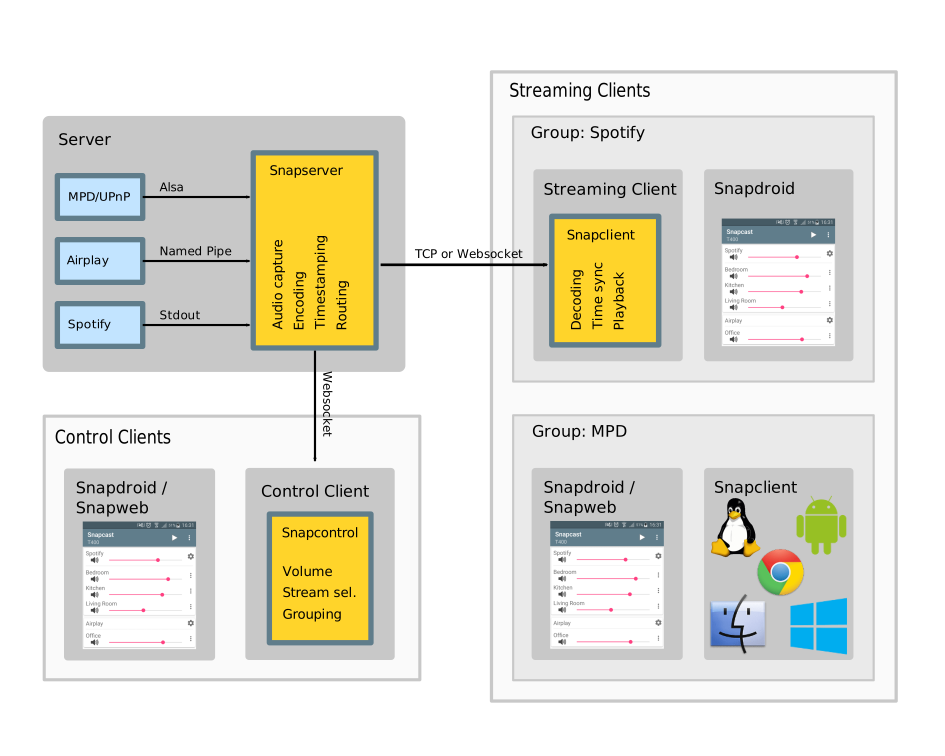
Have you looked at snapcast? It’s one of the tools I’m going to evaluate for a similar use case. I’m not sure if it works with Plex OOTB but it the docs say it supports UPnP. Snapcast is actively maintained so you can just create an issue on github and see how they reply.
Same. I just know there is a lot more out there and hope those ppl chime in. 🤞
You’re not wrong. If CrowdSec is your entire approach, it’s a little weird. But I use it as a (small) part of my overall blocking strategy. I use other lists and frankly, block most IPs by default. Those other IPs aren’t counted in the email screenshot though… only the CrowdSec based ones are coming through. I think a lot of the 137k above are just scanning bots to be frank.